Glanceability prototype

14.11 / 15.11

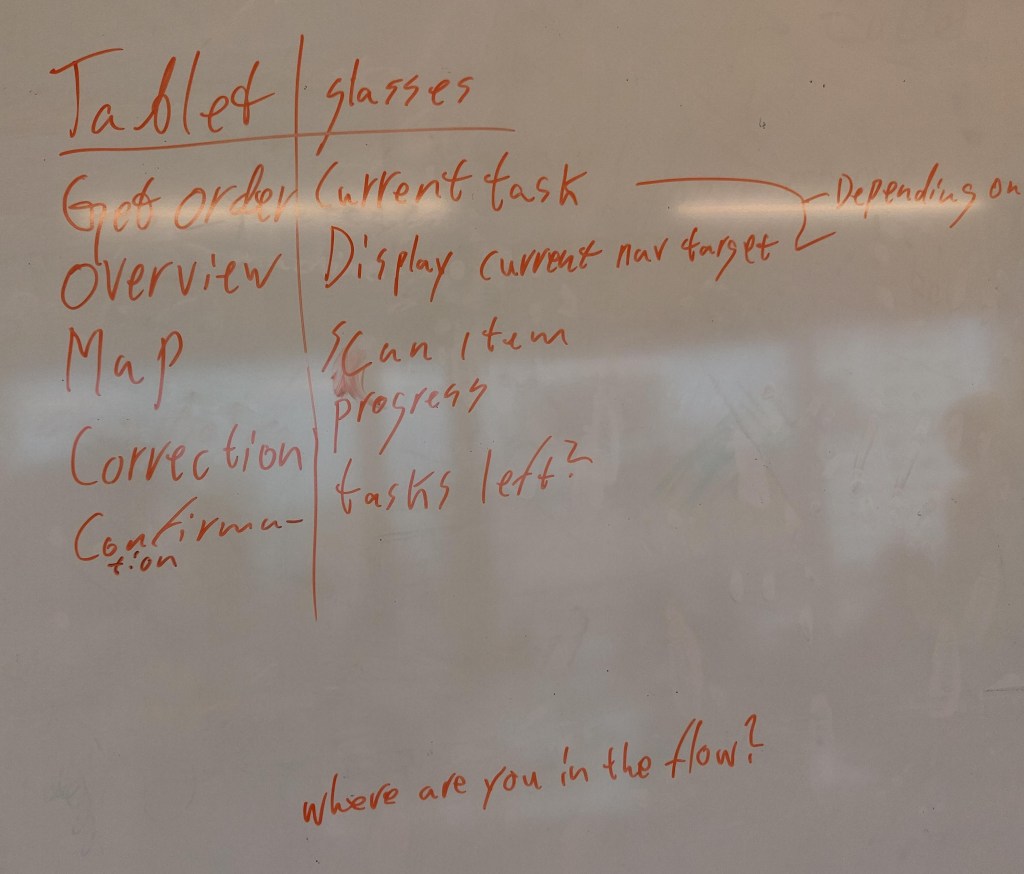
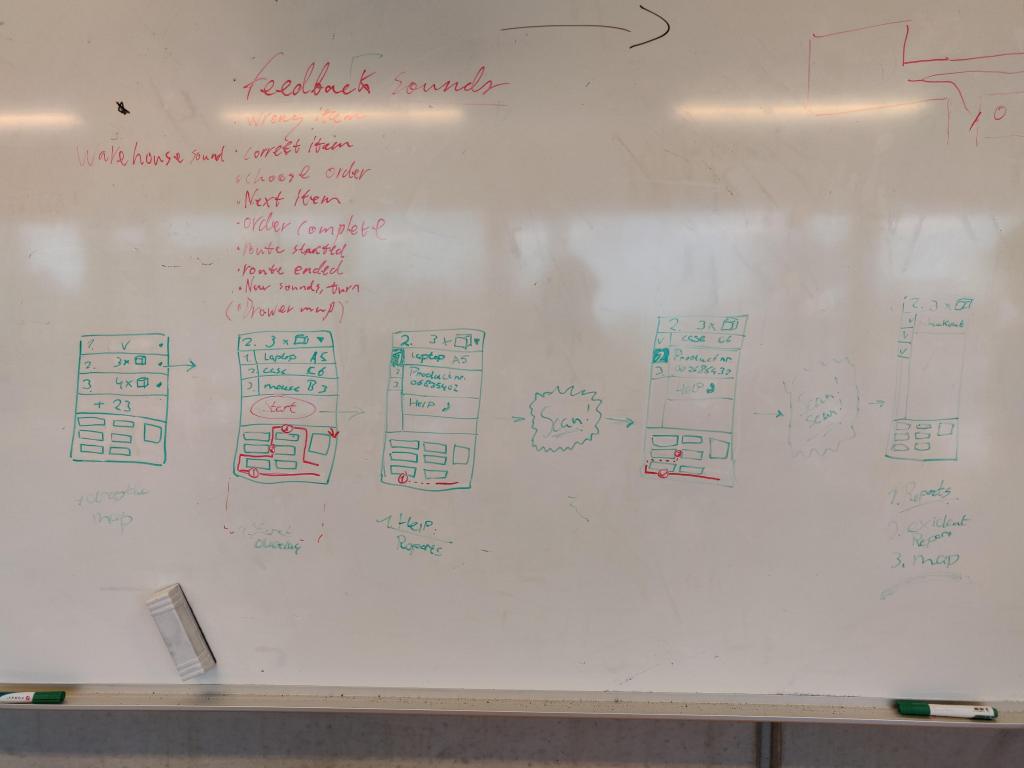
Thursday morning we will start making the tablet prototype. Before we started making this on paper, we first sketched it out on a whiteboard so that we could easily make adjustments. We were also able to clearly determine for each sketch what the smart glasses would display in combination with the tablet. An image of this can be seen below.
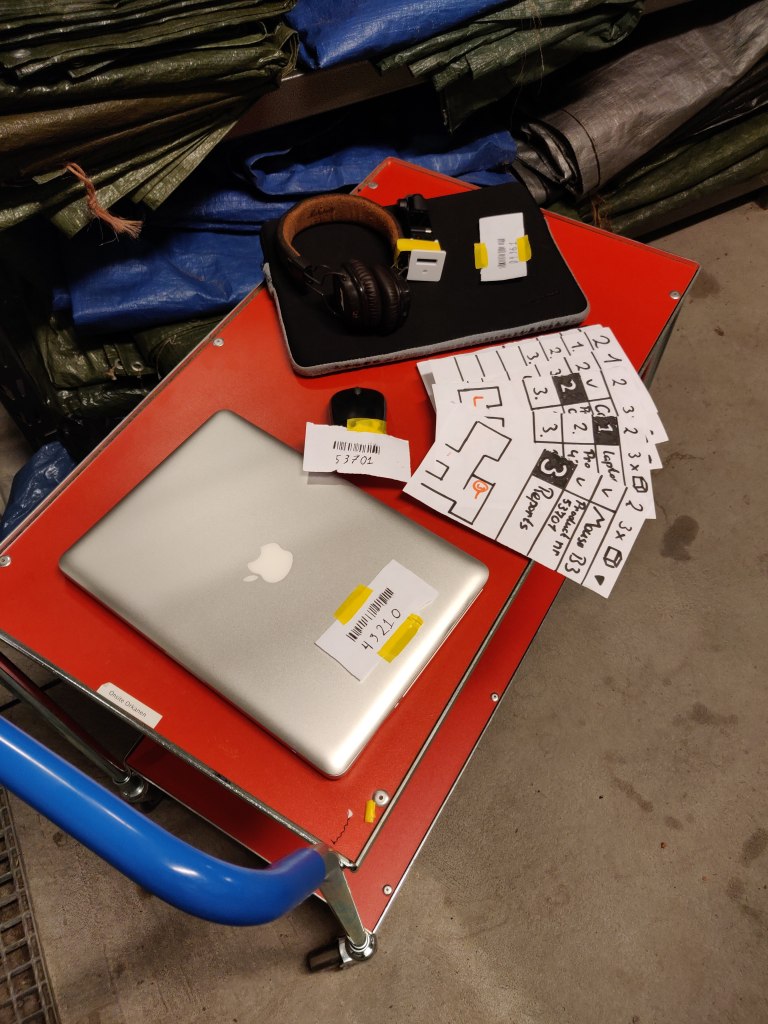
We also made the barcodes and made sure that they match the tablet’s prototype. Everything is based on the shot list we made yesterday, which meant that the paper prototype was done fairly quickly. An image of all parts of the prototype can be seen below.
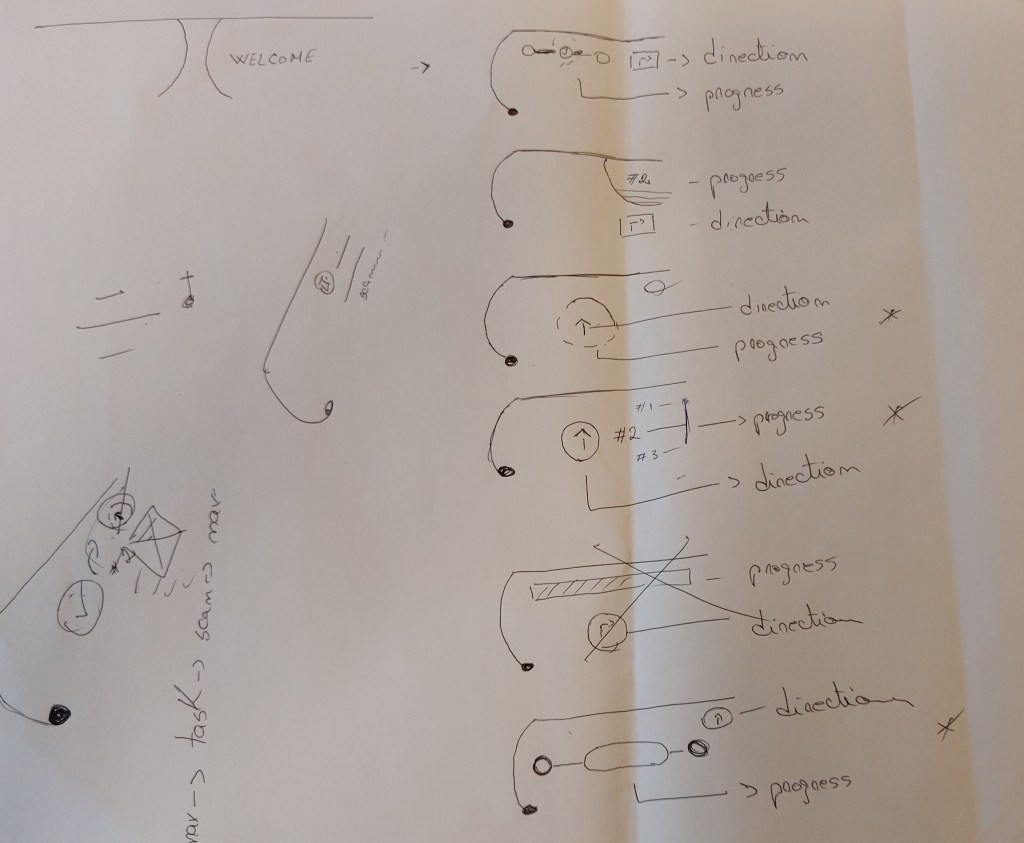
The only thing that is still missing is the information provided by the smartglasses. We also want to make this in the form of a paper prototype. We thought it would be logical to do this after making the video. So that we could film this part while watching the video from the first person perspective. We did, however, sketch this quickly so that we knew how we wanted it to look. An image of this sketch can be seen below.
We created the first person perspective by attaching a go pro to headphones. An image of this can be seen below.
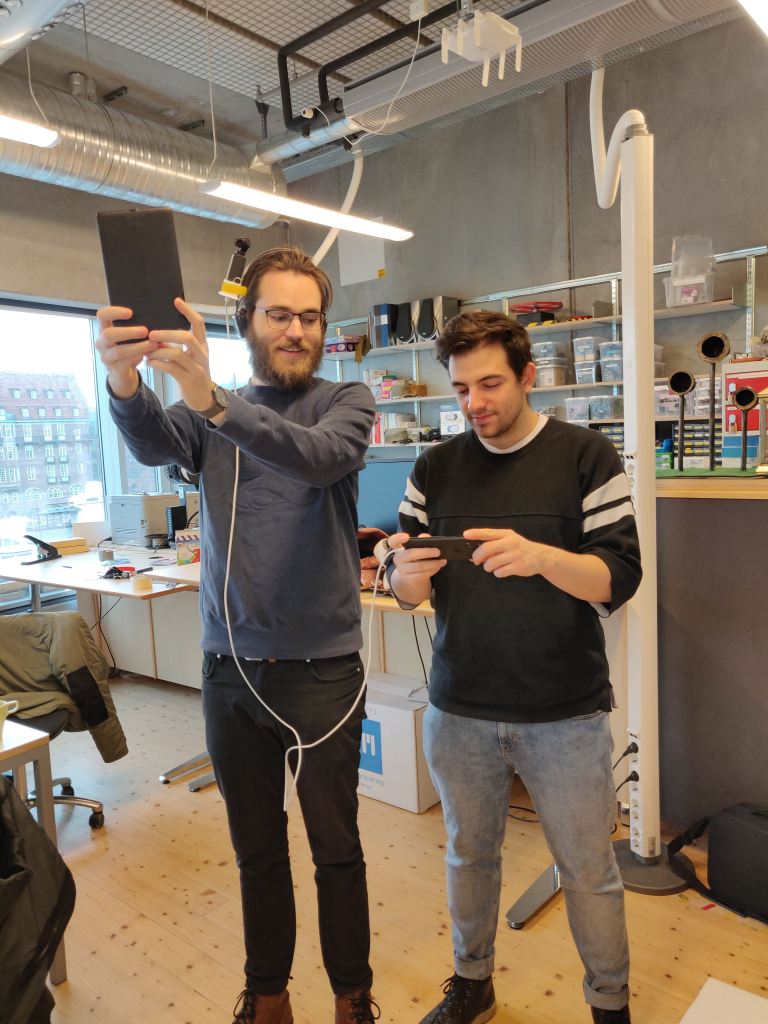
The filming of the video itself got off to a good start because we had made a lot of preparations. However, what made filming difficult was that we wanted to film it as a one shot. The reason for this was that we did not want to confuse the audience, where you are in the storage facility.

This means that we have to make a flawless shot. In which all actions, timing and changing of the tablet (which mainly takes place outside of the camera shot) must go well in one go. Unfortunately, this made it take longer than we had hoped. But after filming again a few times, we finally had a shot that we were happy with.

After filming the shot, it was time to edit the video. This consisted of cropping the image, speeding up where necessary and adding audio. Because we had to talk while making the one shot to coordinate everything, we could not use the existing audio. This means that we must add set noice and sound effects during the edit.

At the same time we were busy making the feedback of the smart glasses on paper. But we soon realized that this would take much more time than we had expected. Because we had already lost a lot of time creating and editing the video, we had to quickly look for a suitable solution.

The plan was to split us up and see what would work the easiest. Andrei and Kim tried to do this through acture. And at the same time Manuel and I focus on after effects. After about an hour we realized it was easier to make it into after effects. We could easily put the animation over the existing video. And it was harder to export an acture file and edit it in the video.

Because we made the feedback in after effects, it gave us the opportunity to think again about the feed back. For this we looked back closely at the articles and especially the article “Evaluating Peripheral Displays” (Tara Matthews et. All 2009).

A number of heuristics are mentioned that we wanted to implement even better in the smart glasses. For example, we have incorporated the “Error Visibility and Recovery” heuristic into it by giving feedback about whether you have the correct product. This is communicated by means of a green or red color and a corresponding sound. The reason for this is because it is a logical communication that you are used to. What fits well with the “Learnability” heuristics, the more the prototype resembles existing forms of feed back, the easier it is to learn. The arrow that we use to indicate the direction is similar to that of a compass. And the circle that indicates how far you are in the process is similar to that of a loading bar.

We have incorporated the “Distraction” heuristic by only displaying a change in the feed back when you are ready for the next step in the process. You have some control over it since it works together with the tablet. The heurestic “Awareness” is incorporated in it by only giving feedback about what you are currently working on. This cannot be more than two forms of information, for example direction and process information.

The last two heuristics “User Satisfaction” and “Usefulness” are difficult to process in the prototype at this time. But our extensive preliminary investigation ensures that these have been addressed.

The presentation took place on Friday. And the presentation went reasonably well. It was a shame that we had little time for the presentation. As a result, we did not have enough time to share all the steps in our design process and some parts went too fast and were therefore unclear. The video of the prototype also took too long and the concept was communicated fairly quickly.

If I did everything again, I would spend less time on the video and at least halve it in time. Which gives us more time and to share more information during the presentation.
Glanceability project

13.11

From Wednesday my team and I started working on the project that we have to present on Friday. We had already made a start Tuesday by making a choice as to what the starting point will be.

The brief we received for the project was as follows:

“Given the definition of glanceability made in the course, design through bodystorming and paper prototypes the behavior of a multi-screen UI. The scenario can be, for example: “

  • a cyclist wearing a smartwatch, a smartglass and a cellphone.
  • a driver looking at the car’s dashboard and wearing a smartwatch.
  • a person working at a storage facility refilling shelves wearing a smartglass and carrying a tablet.
  • any other scenario you could imagine using 2 or more screens to accomplish a single task or a series of tasks’.

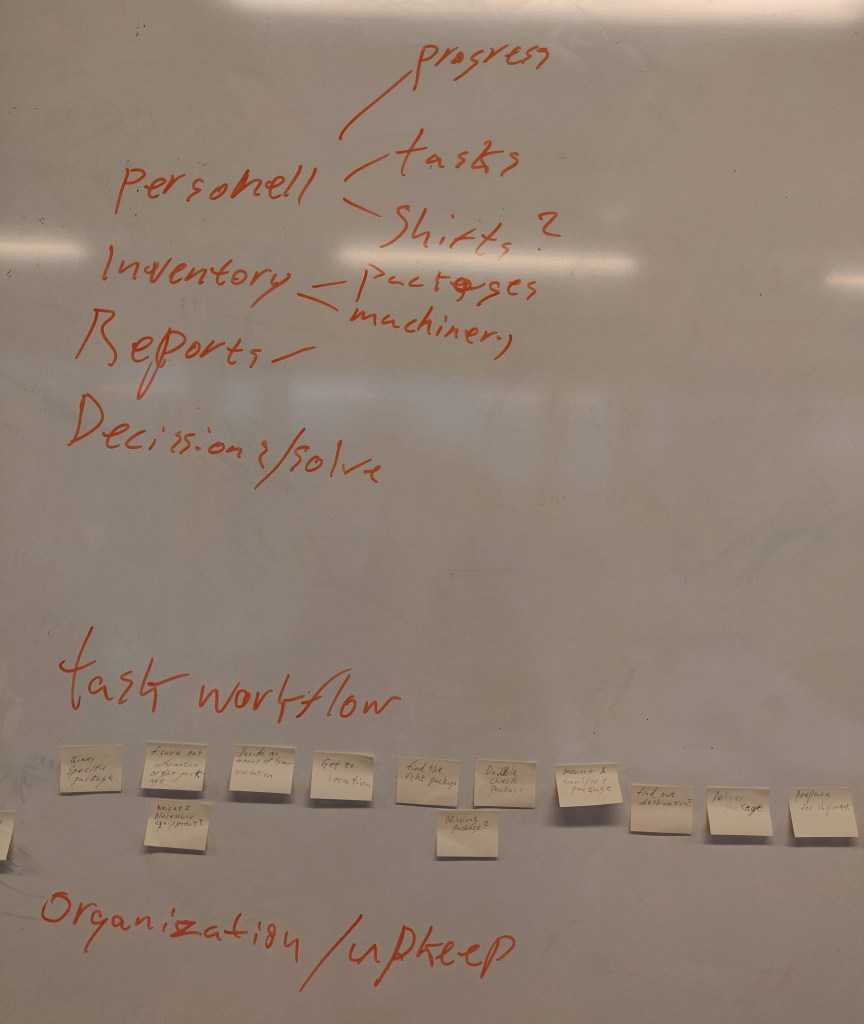
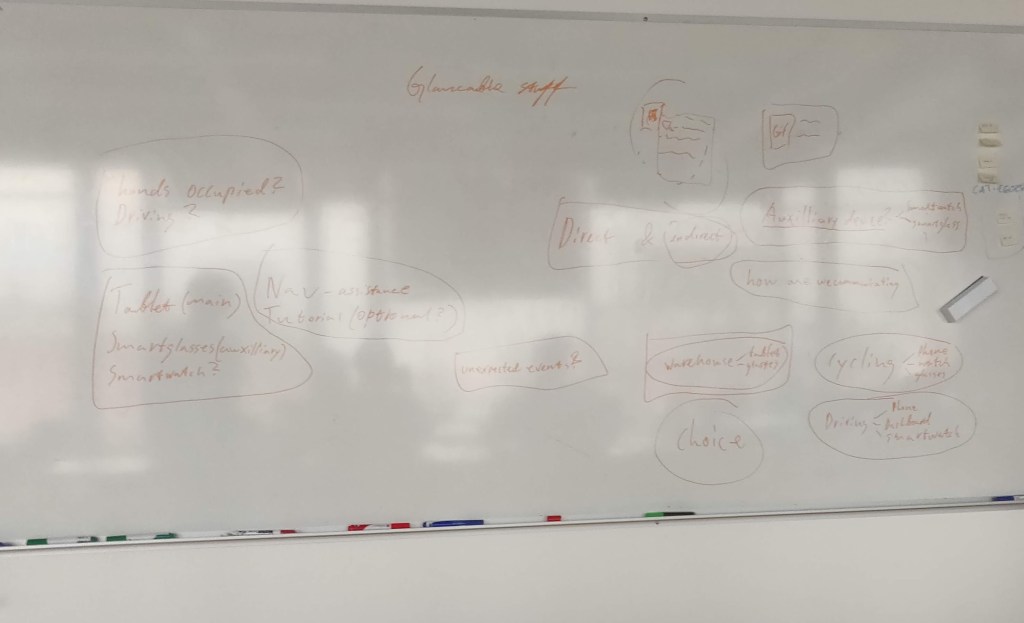
The first brainstorming session consisted of writing down all provided scenarios and coming up with new ones. What inspires us as a team? And do we already see possible applications of glanceability in one of these scenarios? An image of this brainstorm can be seen below.

With the team, we have decided to go for the following scenario: “A person working at a storage facility refilling shelves wearing a smart glass and carrying a tablet.” There were a number of reasons for choosing this starting point:

  • We saw a lot of potential in the combination of smart glasses and a tablet. When we discussed the topic, certain ideas quickly emerged about how Glancebility could play a role in this combination.
  • We thought it was a challenge to make a prototype for smart glasses. When we started to think about how we wanted to visualize the combination of these devices in a prototype, we had no idea. And that is why we thought it would be a challenge to experiment with different ways of prototyping.
  • We have no experience of working in a storage facility, but we think that glanceability can play a valuable role in this work. And we assume that it is a process with quite a few steps in which many small mistakes can be made. We could potentially prevent these small mistakes by adding Glancebility.

After choosing the scenario, we started creating a user journey. This was based on our expectations of what it is like to work in a storage facility. An image of this user journey can be seen below.

But we soon realized that we knew too little about working in a storage facility for a suitable application of glanceability. And the solution that we would come up with would then only be based on our expectations. We, therefore, decided to interview friends who did have experience in working in a storage facility. There were a number of things that we wanted to find out.

  • What are the different tasks in a storage facility?
  • Where is the biggest opportunity for improvement?
  • Is there already a form of technology used in this process?

It has been a good choice to contact experts. After the interview, we got a much better understanding of the different tasks within a storage facility. For example, we discovered that there are three different functions that are executed.

  • Supervisor
  • Storage facility worker
  • Team leaders

We have decided to focus on storage facility workers because this is where the greatest opportunity lies to implement glanceability. One of the tasks of storage facility workers is order picking. This accounts for 60% of all activities in a storage facility. And is also the activity where most mistakes are made.

Order picking is a process where storage facility workers must assemble a package by collecting multiple items. Mistakes that can occur during order picking is forgetting items or packing the wrong items. There is also room for improvement in wayfinding when searching for different items. Because the layout in a storage facility is adjusted weekly, mistakes are also made here.

They currently use scanners for order picking. But the only thing that these scanners indicate is which item you just scanned. And is therefore not related to the order that you are currently working on. They also have to keep track of how many items still need to be collected, at the same time.

After collecting this information we were able to improve our user journey.

Now that we had formulated a suitable user journey and knew where there was room for improvement in this process, it was time for the next step. Coming up with the functionalities of the tablet and the glasses and how they work together.

An image of this brainstorm can be seen below.

The main function of the tablet will be a general overview of the order. While the glasses will focus on the specific item that you are currently working on. There is only physical interaction with the tablet. Because the glasses and the tablet are linked to each other, the process on the glasses is updated as soon as there is interaction with the tablet.

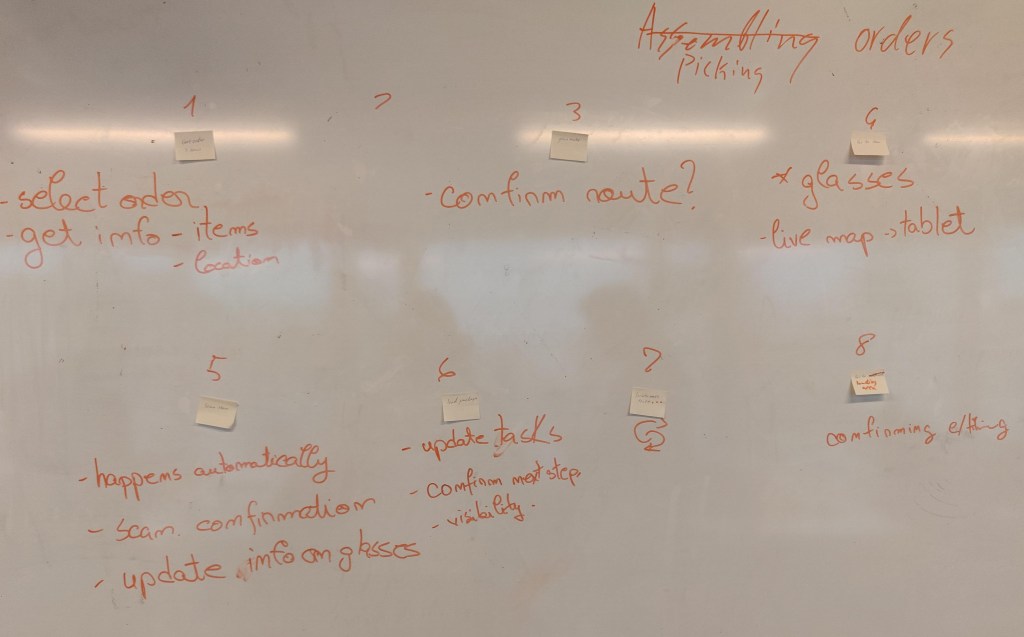
Now that we have the functionalities of both devices, it’s time to link them to the user journey. An image of this can be seen below.

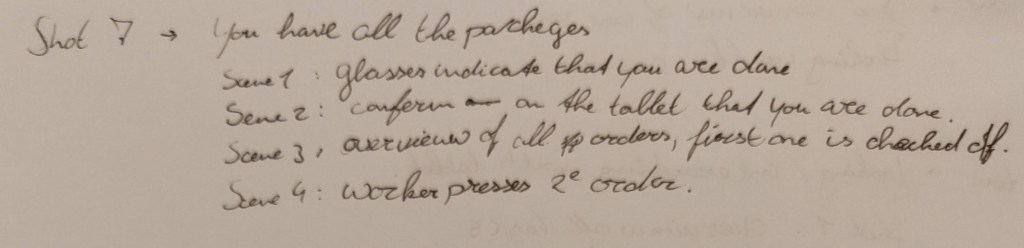
After compiling this, we started to think about how we were going to convert this into a video prototype. And after some brainstorming, we thought it would be a good idea to present this in the form of a first-person view. So that we can record the interactions with the tablet from the perspective of the user. And later on, edit in the glanceable view of the smart glasses.

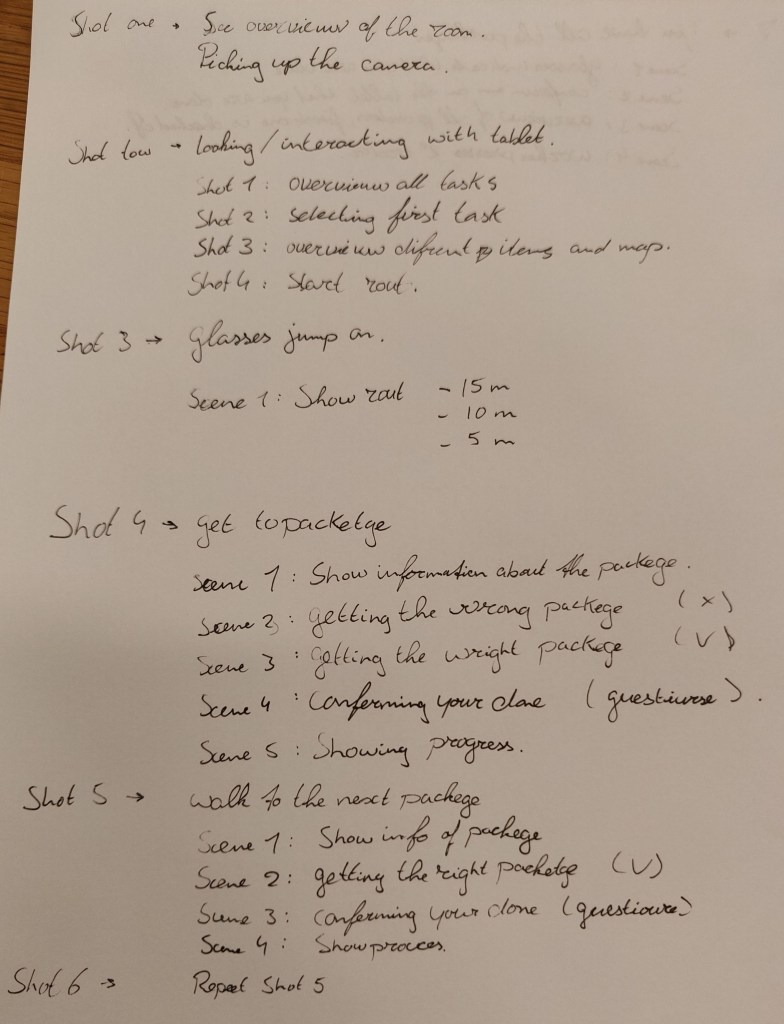
For this, we need to make a clear shot list that describes each step. What interaction takes place with the tablet and what kind of reaction does the glanceable view of the smartglasses represent?

Glanceability introduction

11.11 / 12.11

Monday was the kick-off of course 2, Tangible and Embodied Interaction. This course is subdivided into a number of different modules. And this week’s theme was Glanceability.

But what is Glanceability?


“Glanceability refers to the perception and interpretation of information after
the user is paying attention to the interface“
– Tara Matthews –

[…] enables people to get the essence of
the information with a quick visual glance

– Gouveia et al. –

So in short, an interaction that offers information and lasts no longer than
5 seconds. A simple example of this is: quickly look at your smartwatch to see
if you have received messages.

But before we went into depth on glancebility, we received information about
“cognition”. Because I studied psychology for a year, I came into
contact with this term a lot. And I mainly know cognition in it’s traditional
meaning, namely: “the mental action or process of acquiring knowledge
and understanding through thought, experience, and the senses”
.

But what struck me during the presentation was that here a different meaning was given about the concept of cognition. It was described as a mix between psychology and philosophy. For example, cognition does not only relate to the interpretation of information but also the processing thereof. And how our brains make logic from this information.

It was interesting to think about cognition in this way. However, I do not yet see the relevance of this in relation to the traditional interpetation of cognition. That is also because we went through it quickly, I would like to have elaborated on this. In order to know better how I can use this in my design process.

After the presentation we had to read three articles about Glanceability. These articles were the subject for the seminar that took place on Tuesday and formed the basis for the project that we have to present on Friday.

Seminar

During the seminar we started a conversation about the articles that we had to read. This was the first time I experienced a seminar, and I didn’t know what to expect in advance. In preparation, we had received a number of questions related to the articles.

My overall experience about the seminar is positive. You learn to look at articles in a completely different way than I am used to. My overall experience about the seminar is positive. You learn to look at articles in a completely different way than I am used to. Thus the seminar started with a legitimate question: “Who wrote this article and you checked the author?“

I had not thought about this myself. But of course it makes sense, if the author of the article has a bad reputation, that says something about the legitimacy of the article. I did, however, see that all three studies come from an American university. And normally I try to avoid American research as much as possible because they are often funded. But because they are fairly recent, that is a good sign that they are legitimate. So from now on I will specifically look up the authors of the article to do a check on whether I can trust the article.

Another interesting point that came up during the seminar was the following: “Is my design good for society?”. Everything we are going to design as interaction designers will have a certain impact on society. A glaceble interface requires a lot of attention from a user by continuously sending notifications. Which can potentially influence the condition of a user. It may therefore be good to offer a user the option to turn off these notifications.

Maak je eigen website, gratis op WordPress.com.Maak je eigen website
Start gratis